Easter Celebration Party Flyer: A Designer's Template for Impact
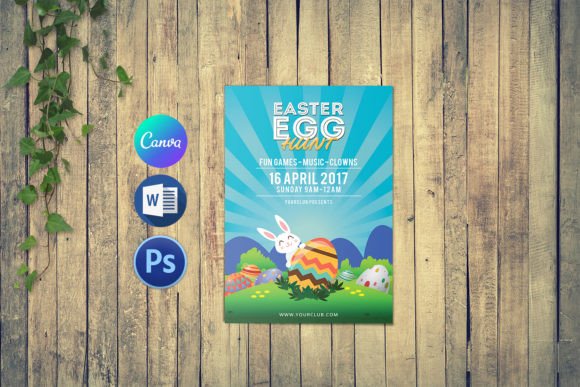
Spring is in the air, and with it comes the annual challenge: how do you create an Easter celebration flyer that actually stands out? You need something that feels fresh, festive, and professional—without spending hours starting from scratch. That's where a well-crafted template like the Easter Celebration Party Flyer comes in. It's not just a pre-made design; it's a foundation built for real-world use, giving you the flexibility to create something unique while ensuring a polished result.
Understanding the Template's Design DNA
This Easter Party Invitation Flyer Template is designed with clarity and versatility at its core. Offered in two standard print sizes—4x6 inches and 5x7 inches—it's ready for everything from handouts to mailed invitations. The 300 dpi resolution and CMYK color mode mean it's built for professional print output, ensuring your colors look vibrant and sharp on paper. The inclusion of a 0.25-inch bleed is a practical detail that prevents white edges after trimming, a small but crucial element for a finished, commercial look.
The real power lies in the working files provided: a Photoshop CS6 (PSD) file and a Microsoft Word (.Docx) file. This dual-format approach is a significant advantage. Designers can dive deep into the layered Photoshop file, customizing every element with precision using the text tool to swap out copy and fonts effortlessly. Entrepreneurs, marketers, or hobbyists who might be less comfortable with advanced design software can use the Word file to make quick, effective edits. This makes the template accessible to a wide audience, from professional graphic designers to small business owners planning their community event.
Practical Applications Beyond the Invitation
While the name suggests a party invitation, a versatile template like this is a valuable design asset with multiple uses. Think of it as a starting point for your entire Easter campaign's visual identity.
- Event Marketing: Use the flyer as a digital graphic for social media posts, Facebook event covers, or email newsletter headers. The consistent visual language helps build recognition for your event.
- In-Store or Community Promotion: Print the flyers to promote a church service, a community egg hunt, a restaurant special, or a retail sale. The professional print-ready specs make this straightforward.
- Brand Consistency: For a business, the template can be adapted to create matching thank-you cards, table tents, or website banners, reinforcing your brand's festive personality across all touchpoints.
- Personal Projects: Crafters and hobbyists can use it to create personalized party favors, scrapbook elements, or digital invitations for family gatherings, adding a custom touch without complex design work.
The key is to see the template not as a finished product, but as a flexible framework. By changing the text, adjusting colors, or swapping out a background element, you can align it perfectly with your specific brand palette or the theme of your event.
Making It Your Own: A Step-by-Step Approach
Getting started is simple, but a strategic approach will yield the best results. First, open the file in your preferred software—Photoshop for full control, or Word for ease of use. The help file included with the download provides the necessary font links, ensuring your typography matches the original design's intent.
Next, focus on customization. Use the text tool to replace the placeholder information with your event details: the date, time, location, and RSVP information. This is also the moment to consider your font pairing. While the template uses specific fonts, you can experiment. Try pairing a clean sans serif font for the body text with a complementary script font or display font for the headline to create visual interest and improve readability. Always test your chosen fonts at the final print size to ensure they are legible.
Finally, consider the overall visual hierarchy. Guide the viewer's eye from the most important information (like "Easter Celebration") down to the details. Use size, weight, and spacing to create clear sections. A well-structured flyer doesn't just look good; it communicates effectively, which is fundamental to good editorial design and marketing materials.
Ensuring a Professional Outcome
A template provides the structure, but the details determine the quality. Before you finalize your design, run through this checklist:
- Proofread Relentlessly: Check every piece of text for spelling and grammatical errors. A single typo can undermine the professionalism of your entire piece.
- Check Alignment and Spacing: Ensure all text and graphical elements are neatly aligned. Consistent margins and spacing contribute to a clean, organized layout.
- Verify Print Specifications: Double-check that your final file is set to 300 dpi and CMYK color mode if you're sending it to a professional printer. Confirm the bleed is correctly set if your design extends to the edge.
- Save Correctly: For print, save a high-resolution PDF. For digital use, a high-quality JPEG or PNG is suitable.
By treating this Easter Celebration Party Flyer template as a professional starting point and applying careful, thoughtful customization, you can produce a piece that effectively promotes your event and reflects a high standard of design. It's about leveraging a practical tool to achieve a real-world goal: creating an engaging, effective invitation that gets people excited for the celebration.