Ignite Your Typography: A Guide to Fire Text Effects
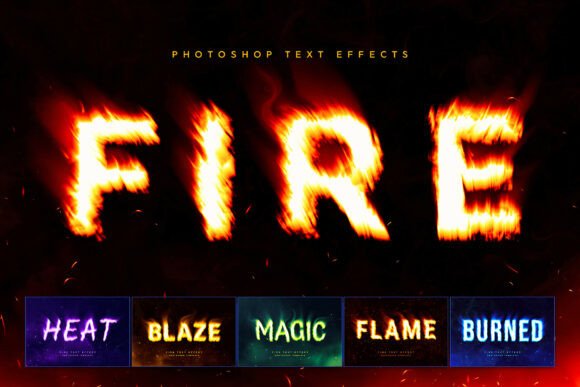
In a digital landscape saturated with static images and predictable designs, capturing attention demands more than just good content—it requires a visceral, immediate impact. Fire Text Effects provide exactly that. This isn't just a premium font collection; it's a dynamic design asset toolkit that transforms standard lettering into a blazing, cinematic spectacle. Imagine your title text wreathed in realistic, roaring flames, accompanied by smoky plumes and floating embers, all rendered with the depth and drama of a Hollywood title screen. The visual personality is unmistakable: intense, energetic, and impossible to ignore.
The Anatomy of a Blazing Typeface
At its core, the Fire Text Effects toolkit is a sophisticated set of Photoshop templates designed for practical, high-impact use. The appeal lies in its blend of realism and versatility. You're not getting a single, static fire effect. Instead, you have access to six distinct chemical style variations. These range from the classic, warm glow of orange embers—perfect for a familiar, powerful feel—to more niche options like mystical green flames for fantasy themes or ethereal blue glows suited to sci-fi and tech branding. Each variation includes meticulously crafted layers for volumetric lighting, subtle heat distortion waves, and atmospheric dark smoke overlays. This attention to detail ensures the final result has depth and dimension, avoiding the flat, cartoonish look of lesser effects.
The true power for creators, however, lies in the streamlined workflow. This is where the toolkit functions like a creative font generator with unparalleled speed. The process is built around Smart Object technology in Photoshop. You simply double-click a designated layer, replace the placeholder text with your own custom logo, monogram, or chosen typeface—whether it's a bold sans serif font, an elegant script font, or even a detailed handwritten font—and save. The system automatically applies all the complex fire, smoke, and lighting effects instantly. This transforms what would typically be hours of advanced digital painting and compositing into a matter of seconds, delivering a cinema-ready title screen without the steep learning curve.
Strategic Applications: Where Fire Truly Burns Brightest
Understanding where to deploy such a powerful display font effect is key to its success. Its aggressive, high-energy personality makes it a natural fit for specific niches where standing out is non-negotiable. For gaming graphics—esports logos, stream overlays, and video headers—the fire effect communicates intensity, competition, and power. It’s the visual equivalent of a battle cry, instantly setting the tone for a channel or team brand.
Similarly, in the music industry, particularly for genres like rock, metal, trap, or experimental electronic, Fire Text Effects can define an album cover or promotional poster. It provides the raw, visceral energy that complements the sound, making it a cornerstone for editorial design in music publications and event flyers. For streetwear apparel art, the effect translates perfectly to bold graphic placements on t-shirts and hoodies, tapping into an urban aesthetic that values stark, impactful imagery.
Beyond these obvious fits, consider its use in social media graphics. A scroll-stopping YouTube thumbnail or an Instagram header featuring fiery typography can dramatically increase engagement. The effect’s inherent visual hierarchy ensures your title is the first thing seen, which is critical in fast-scrolling feeds. Even in packaging design for limited-edition products—like a special hot sauce, an energy drink, or a gaming accessory—the fire effect can create a memorable unboxing experience and communicate product attributes instantly.
Practical Guidance for Implementation and Brand Fit
While the effect is visually stunning, strategic application is crucial for maintaining professionalism and clarity. The first consideration is readability. Fire Text Effects are best used for headlines, logos, and short titling where impact outweighs the need for comfortable body-text reading. Always test your chosen word or phrase within the Smart Object to ensure the flames don’t obscure critical letterforms. A strong, bold sans serif or serif font with simple shapes often holds up better than an overly intricate script font when engulfed in flames.
Evaluating project fit is the next step. Ask yourself: does the intense, fiery personality align with my brand identity or campaign message? It’s a perfect match for brands that want to be perceived as passionate, energetic, or rebellious. For more subdued, elegant, or minimalist brands, it may be too aggressive. The toolkit’s six style variations offer some flexibility; a blue or green flame might suit a tech company’s product launch better than the classic orange, for example.
When it comes to font pairing, contrast is your friend. Use the fiery headline for maximum impact and pair it with a clean, highly legible modern typography choice for subheadings and body copy. A neutral geometric sans serif can provide a calm counterbalance to the visual noise of the flames, guiding the viewer’s eye through the rest of your layout. This practice upholds visual hierarchy and ensures your overall design remains structured and professional.
Finally, always review the included assets. The provided PDF with font links and instructions is essential for commercial projects. If you plan to use the final design for a client, merchandise, or digital product, verify that the base fonts used within the template are cleared for such commercial font licensing. This due diligence protects you legally and ensures your brand perception remains untarnished. By treating Fire Text Effects as a powerful tool in your design arsenal—deployed with intention and strategic thought—you can harness its blazing potential to create unforgettable logo design, web design elements, and marketing materials that truly ignite audience engagement.