Investor Pitch Deck Google Slides: A Designer's Guide to Professional Presentations
When you're standing in front of potential investors, your presentation needs to do more than just display information—it needs to tell a compelling visual story. The Investor Pitch Deck Google Slides template is built exactly for this moment. It's a clean, contemporary design framework that helps entrepreneurs and business professionals present their ideas with the kind of polish that builds confidence and credibility.
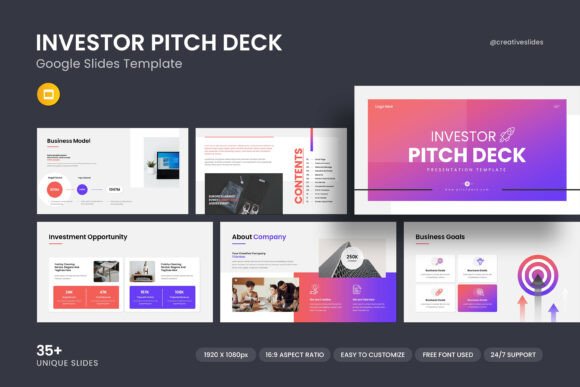
What makes this template stand out isn't flashy gimmicks or overwhelming graphics. Instead, it relies on thoughtful design principles: balanced layouts, strategic white space, and a professional aesthetic that lets your content breathe. The overall personality is modern yet approachable—serious enough for a boardroom but never cold or sterile. It strikes that sweet spot where professionalism meets visual interest, which is exactly what you need when trying to secure funding or partnership opportunities.
Where This Template Truly Shines
The Investor Pitch Deck Google Slides template works across a surprisingly wide range of professional contexts. Obviously, it's built for pitch presentations to venture capitalists, angel investors, and financial stakeholders. But its clean design language makes it versatile enough for quarterly business reviews, client presentations, internal strategy sessions, and even conference talks where you want your slides to look polished without stealing focus from your message.
For entrepreneurs and startup founders, this template handles the typical pitch deck flow naturally—problem statements, solution descriptions, market analysis, business models, team introductions, and financial projections all have dedicated slide layouts. The creative photo layouts let you showcase your product or service visually, while the infographic elements help you present data in ways that actually make sense to people who are hearing your numbers for the first time.
Small business owners will find it equally useful for presenting to potential partners, applying for business loans, or even pitching to larger companies they want to work with. The professional design signals that you take your business seriously, which matters more than most people realize in these situations.
Design Elements That Make a Real Difference
Let's talk about what's actually inside this template, because the details matter. The 36 slides give you enough variety to build a complete narrative without feeling repetitive. You get multiple layout options for different content types—some slides emphasize visuals, others prioritize text or data, and several are designed specifically for charts and diagrams.
The vector icons are particularly useful. Instead of hunting for stock icons that may or may not match your brand aesthetic, you have a cohesive set ready to use. These icons help create visual consistency throughout your presentation, which is one of those subtle design choices that separates amateur presentations from professional ones.
The infographic elements deserve special mention because data presentation is where most pitch decks fall flat. Numbers on a plain background don't tell a story. But when you can show market growth through a well-designed chart or illustrate your revenue model with a clear diagram, investors can grasp your business potential much faster. This template includes several infographic styles that handle different data visualization needs.
Color customization is straightforward, which matters because your pitch deck should reflect your brand identity. The master slides layout means you can make global changes efficiently rather than editing each slide individually. If your company uses specific brand colors, you can adapt the entire presentation to match without breaking the design structure.
Practical Tips for Getting the Most From This Template
Here's some honest advice from someone who's seen hundreds of pitch presentations: the template gives you a strong foundation, but your content strategy still needs to be solid. Start by mapping out your narrative before you even open the file. Know which slides will carry your most important messages, then choose layouts that support those messages visually.
The drag-and-drop picture feature makes it easy to add your own photography and screenshots, but be selective. Every image should earn its place on the slide. A cluttered slide with too many photos or graphics will undermine the clean aesthetic that makes this template effective in the first place.
When it comes to font pairings, the template uses free fonts, which is both practical and smart. You won't run into licensing issues, and the chosen typefaces maintain readability across different screen sizes and projection environments. That said, if you're presenting in a large conference room, test your slides on a projector beforehand. Text that looks perfect on your laptop screen might be too small when projected.
The 16:9 aspect ratio is the current standard for presentations, so you're covered for most modern display setups. The full HD resolution means your slides will look crisp on high-resolution screens, which increasingly matters as more meeting rooms upgrade their display technology.
Working Across Platforms and Environments
One practical advantage worth noting: this template works on both Apple and Windows systems through Google Slides. For teams where members use different operating systems—or for founders who might be presenting from someone else's computer—this cross-platform compatibility eliminates a common source of last-minute technical problems.
The included help file is genuinely useful, not just a throwaway PDF. If you're newer to Google Slides or presentation design generally, take twenty minutes to review it before you start customizing. Understanding the master slides system and how the template is structured will save you significant time during the editing process.
For those who need additional support, the designers behind this template offer real assistance. That's worth mentioning because many template marketplaces sell files and disappear. Having access to someone who understands the template's structure can be valuable when you're working under deadline pressure.
Whether you're preparing for your first investor meeting or your fiftieth, having a reliable design framework removes one variable from an already stressful process. The Investor Pitch Deck Google Slides template gives you that framework—professional enough to build credibility, flexible enough to adapt to your specific story, and practical enough to actually use without a design degree.